
Cartoon Avatars
Turn a clear headshot into distinctive profile art for social accounts, communities, games, or creator branding.
Choose a visual preset for your photo instead of writing style instructions from scratch. Each option changes the linework, color, texture, and mood while keeping the subject at the center.
A cartoon photo generator interprets the people, pets, products, or places in an uploaded image and renders them as new cartoon artwork in the visual direction you choose.
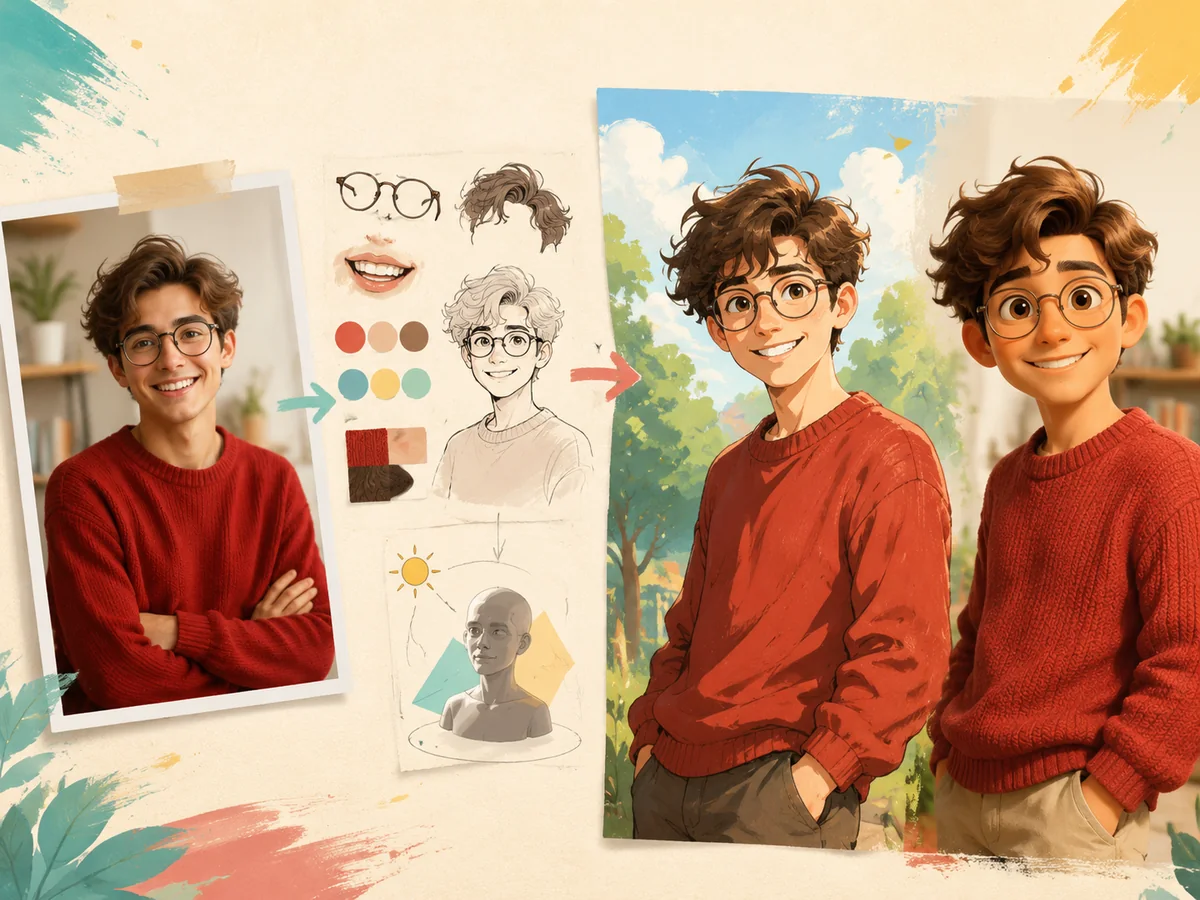
The model reads recognizable details such as glasses, expressions, clothing, pose, and the relationship between the subject and background.
Lighting, shapes, color, and material are reconstructed for the selected style instead of placing a fixed effect over the original pixels.
Use the result as a portrait, pet illustration, avatar, product visual, gift, or starting point for another creative project.
Start with a recognizable photo and explore different cartoon treatments for people, pets, products, food, and favorite places.
Turn a clear headshot into distinctive profile art for social accounts, communities, games, or creator branding.
Keep familiar markings, expressions, and personality in a playful pet portrait made for sharing or gifting.
Transform an everyday portrait into polished illustrated artwork without losing the features that make the person recognizable.
Reimagine a favorite travel photo with cleaner shapes, richer color, and a storybook or animated-film mood.
Turn a favorite photo together into a warm 3D cartoon portrait for anniversaries, gifts, invitations, or shared profiles.
Redraw a recognizable dish or product as bold cartoon artwork for menus, posts, packaging concepts, or promotional graphics.
Turn a photo into anime or cartoon artwork, or create an original character and scene from a written idea. Choose from multiple styles, keep results in My Creations, and generate several variations when you want options instead of a single result.
Upload a portrait, pet, product, or scene, choose a style, and generate a new cartoon version rather than applying a fixed overlay. Add plain-language directions to keep recognizable details such as glasses, expression, hairstyle, clothing, or composition, or to change the pose, background, lighting, and materials.
Describe a character or scene when you do not have a source image. Specify the subject, appearance, pose, setting, mood, props, camera angle, and style to create original characters, mascots, story scenes, thumbnails, or campaign artwork.
Keep generated images in My Creations so you can review and download past results in one place. Reopen an image as a reference, save a result as a reusable character, continue with another variation, or use a still image to start an animation.
Subscribers can create up to four images from the same prompt, style, aspect ratio, and references in one run. Compare different expressions, compositions, or details, then keep the strongest result without rebuilding the setup for every attempt.
Move from a source or rough idea to a reusable cartoon image in four focused steps.
Upload a clear reference, write a prompt, or combine both when you want continuity and creative changes.
Choose a style, aspect ratio, and output quantity. Add the pose, setting, mood, or details that matter.
Create the first result, then adjust the source, prompt, or style when you want another interpretation.
Download without a watermark, keep the image in My Creations, reuse a character, or animate the result.
The useful difference is not one effect. It is how the model understands the input and how the result fits into the next creative step.
The model understands details such as glasses, a smile, or a red sweater. For 3D animation or Ghibli-inspired artwork, it rebuilds lighting, shapes, and materials instead of placing a fixed effect over the photo.
Create an account to receive 5 credits. Daily check-in adds 1 more credit, which can be used for an image generation. Generated image results do not carry a watermark.
Move between anime, comics, illustration, handcrafted, and dimensional styles without purchasing separate style packs.
Use public or self-made characters, keep useful results in My Creations, generate variations in batches, and animate a selected cartoon image.
Different methods solve different problems. AI is useful for fast exploration, filters are useful for simple effects, and manual illustration remains stronger when every line must be controlled.
| Comparison | Cartoon Photo Generator | Photo filters | Manual illustration |
|---|---|---|---|
| Starting point | Photo, reference image, saved character, or text | Existing photo | Photo, sketch, or art brief |
| Result | A newly rendered interpretation | Modified original pixels | Artwork constructed by an illustrator |
| New scenes | Can invent new characters and scenes | Usually preserves the original scene | Can create any planned scene |
| Creative control | Prompt, style, references, and retries | A small set of effect controls | Precise control over individual details |
| Typical time | About 30–60 seconds | A few seconds | Hours or days |
| Batch exploration | Up to four results per run for subscribers | Usually one effect at a time | Usually created individually |
| Best suited to | Fast concepts and repeatable content | Quick novelty effects | Final art requiring exact control |
AI output can vary between runs. Manual illustration remains the better choice when exact line placement, editable vector paths, or strict visual consistency is required.
Straight answers about how generation works, what produces better results, usage rights, timing, and account limits.
It is a tool that interprets an uploaded photo and renders the subject as new cartoon artwork. The result can preserve recognizable details while changing linework, color, lighting, texture, and background.

Upload a clear photo, choose a style, and refine the first result into artwork you want to keep.