Photo to Prompt AI

Use our photo to prompt AI tool to turn any photo, illustration, or existing artwork into an editable, reusable prompt.

Reference image

JPEG, PNG, or WebP up to 10 MiB

What should the prompt keep?

Editable prompt

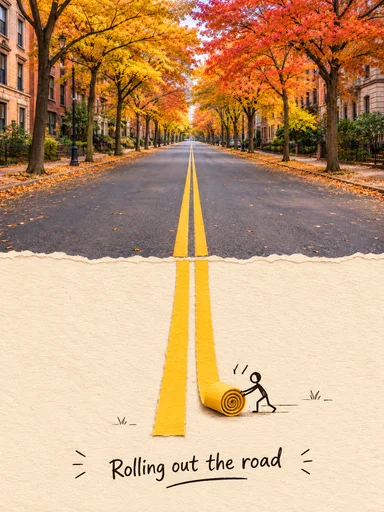
A paper scene showing an autumn street, a yellow road line, and a small paper figure
A paper road scene with warm autumn light, layered texture, and a tiny figure pulling the road forward.

Start with what the image actually shows

Generate an accurate AI prompt from image evidence, turning subjects, lighting, and composition into editable English text.

The parser works from the reference in front of it. In this paper scene, a useful description can point to the autumn street, the yellow road line, the small paper figure, the layered cut-paper surface, and the caption near the bottom. You can keep those details, remove them, or rewrite them before you create.

Try photo to prompt generator

Select your photo to prompt conversion mode

Our photo to prompt workflow provides two extraction modes for different creative goals. Pick the right handoff before spending a credit.

Keep the full visual prompt

Use this mode when you want a close starting point for the reference. The result describes the visible look as well as the scene.

  • Subject, action, and setting
  • Composition, lighting, color, and texture
  • Visible style or treatment, without hidden metadata

Best for: rebuilding a visual idea with a similar mood and composition

Keep the subject and scene

Use this mode when the reference gives you a compelling subject or situation, leaving art direction open for your next creation.

  • The main subject and visible action
  • The environment and spatial arrangement
  • Room for you to choose a new style or medium

Best for: putting the same idea into a cartoon, anime, or other style

A clear photo to prompt workflow from image to text

A practical picture to prompt workflow gives you an editable starting point: keep the core elements, adjust the wording, and use it in your next generation.

  1. 01

    Upload one clear reference

    Use a JPEG, PNG, or WebP up to 10 MiB. A clear reference gives the photo to prompt engine the detail it needs to identify subjects and lighting.

  2. 02

    Choose your photo to prompt handoff

    Keep the full look for a closer visual starting point, or isolate the subject and scene when you want to apply a different style.

  3. 03

    Edit before you create

    Refine any line in your photo to prompt output, copy or download it, or send the edited text to Toonderly's image studio as a separate confirmed action.

Convert image to prompt

Where reverse image prompt tools work best

Photo to prompt AI describes visible elements clearly. It does not uncover hidden seed metadata or make obscured details certain.

Ideal photo to prompt references

  • One photo, illustration, render, or AI image
  • A clear main subject with enough surrounding context
  • A scene where lighting, layout, or treatment matters

Boundary limits and edge cases

  • Blurry images, tiny text, or heavy overlays
  • Crowded collages with many competing subjects
  • Requests for the original prompt, seed, model, identity, or exact camera settings

From photo to prompt to image creation

Copy or edit the prompt first. Continue creating opens the image studio with your photo to prompt result and the selected visual handoff; it does not generate an image automatically. The next generation has its own confirmation and cost.

Input
1 JPEG, PNG, or WebP
Size
10 MiB maximum
Output
Editable English text
Parse cost
1 credit; failed parses are refunded

Know what the image can tell us

Photo to Prompt AI returns a visual description, not the hidden original prompt. Blurry images, tiny text, heavy overlays, and crowded collages can reduce detail. The tool does not identify people or recover seeds, models, or exact camera settings.

Can a reverse image prompt recover the original seed or model?

No. While reverse image prompt extraction describes visible composition and subjects, it cannot recover hidden prompts, seeds, model architectures, or camera metadata.

What happens with blurry photos or small text?

Photo to prompt can still describe visible subjects, but blur, tiny text, overlays, and crowded collages may reduce detail. It is not an OCR accuracy tool.

Where does the uploaded reference go during photo to prompt parsing?

The image is stored by Toonderly and sent to the selected vision provider for photo to prompt parsing. The page does not claim an automatic deletion time; see the site's privacy terms for current retention rules.