

2D vs 3D animation is a choice between two rendering systems, not a ranking. Flat 2D draws your character with ink contour lines and solid color fills. 3D renders the same character as modeled volume with light, material response, and camera depth. Everything downstream — how motion reads, how identity holds, what breaks, and where the clip feels at home — follows from that one decision.
The honest way to compare them is to remove every other variable. So we ran a controlled test: one character, one action, one video model, two rendering systems. This article shows the real stills, the real eight-second clips, and what actually drifted — including one failure we had to fix mid-test.
The test setup: one character, two rendering systems
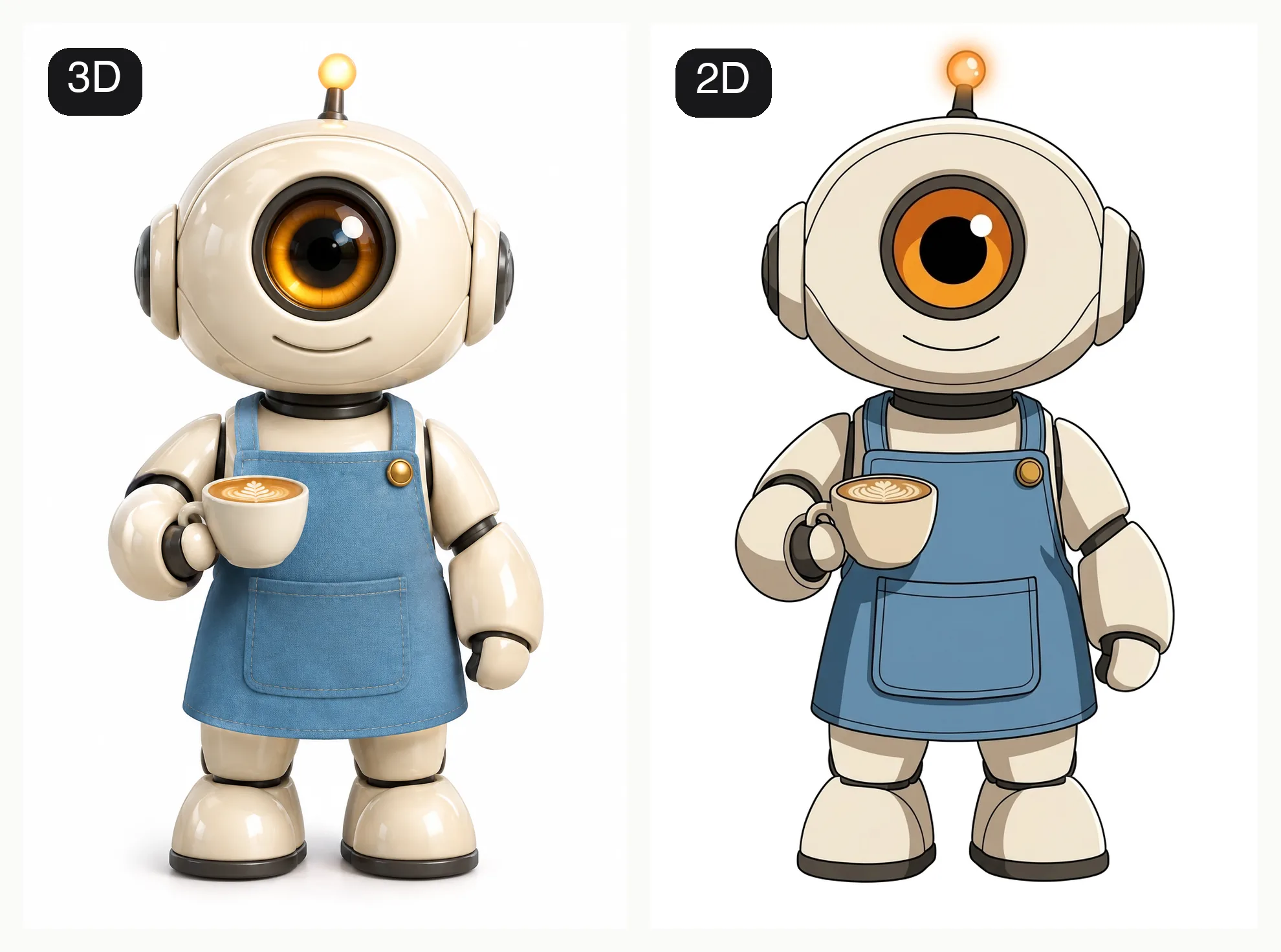
The subject is an original character: a small barista robot with a cream-white shell, one large amber camera lens as its only facial feature, a sky-blue apron, and a glowing antenna light. Those five anchors are what every result gets judged against.
| Held constant | Value |
|---|---|
| Character | The same saved robot character, same identity anchors |
| Action | Slide a paper cup across the counter, then wave |
| Video model | The same model (Veo 3.1 Fast) for both clips |
| Duration, ratio, resolution | 8 seconds, 16:9, 720p |
| The only variable | Rendering system: flat 2D cel-shaded vs dimensional 3D toon |
The 3D base was generated first, then converted to 2D cel-shaded using the 3D render as the identity reference — the same character-reuse workflow the AI cartoon character generator provides. The reference follows the character's identity while the style preset carries the rendering direction, exactly as described in the companion tutorial on creating a cartoon character with AI.
The still comparison: what the rendering system changes
 3D toon · modeled volume, glossy materials, soft cinematic light |  2D cel-shaded · ink contours, flat fills, two hard shadow tones |
Same robot. Five visible things changed:
- Line. The 2D version exists because of its contour lines; the 3D version has no outlines at all and relies on silhouette and edge lighting.
- Shadow. 2D cel uses exactly two hard-edged shadow tones locked to the forms. 3D uses continuous gradients that follow the light source.
- Material. The 3D shell reads as glossy plastic with specular highlights. The 2D shell is a flat cream shape — material becomes color, not surface.
- Depth. 3D suggests a camera with focal depth. 2D flattens the scene into graphic layers.
- Weight. The 2D robot feels lighter and more graphic; the same design in 3D feels physical, like a toy you could pick up.
If you want this comparison across many style families rather than just two, the cartoon art styles guide breaks the whole style library into five visual decisions.
The motion comparison: two real 8-second clips
Both clips were generated with the same model, the same action prompt, and the same settings. The only differences are the style direction and the reference still it follows.
The 3D toon clip
The 2D cel-shaded clip
What we observed, watching both clips against the base character:
- Motion readability. The 2D clip reads pose-to-pose, like Saturday-morning television animation — every frame could be a sticker. The 3D clip reads as continuous performance, with weight and follow-through on the arm movement.
- Identity stability. Both clips kept the cream shell, blue apron, and antenna. The stress point in both was the face, which brings us to the failure worth showing.
- Light behavior. In 3D, the counter and shell respond to the moving light. In 2D, shadows stay graphic and locked to the forms, which keeps small errors from becoming distracting.
What actually drifted, and the fix
The first 3D generation gave the robot two sleepy cartoon eyes and a mouth — anchors gone. The cause was instructive: the 3D style direction asks for "large expressive eyes and nuanced readable facial acting," and the model dutifully built a face to satisfy it, overwriting the single camera lens that defines this character. Restating the lens as the character's one facial feature in the action prompt fixed it; the clip above is that corrected generation.
That is the real consistency lesson for both systems: style templates carry bias (2D templates lean graphic, 3D templates lean expressive), so identity anchors have to be explicit in the prompt. Reference-driven consistency is how the whole field handles this — Runway's Gen-4 References note describes the same reference-image approach for holding identity while everything else changes.
2D vs 3D, dimension by dimension
| Dimension | Flat 2D cel-shaded | Dimensional 3D toon |
|---|---|---|
| Outlines | Ink contour lines define everything | No outlines; silhouette and edge light |
| Shadows | Two hard tones, locked to forms | Continuous gradients, follow the light |
| Materials | Flat color; material reads as palette | Glossy, tactile, specular response |
| Motion feel | Pose-to-pose, graphic, sticker-like | Continuous, weighted, cinematic |
| Identity stress point | Fine line details can wobble | Expressive-face bias can add features |
| Small-display use | Excellent at avatar size | Excellent for hero and cover shots |
| Mood | Playful, graphic, retro-friendly | Polished, warm, production-finished |
| Typical cost | Same model, same credits | Same model, same credits |
Which one should you generate?
| If your project is… | Generate | Why |
|---|---|---|
| Social avatar or profile art | 2D | Reads instantly at small sizes |
| Kids story or storybook feel | Either; 2D leans gentler | Flat shapes feel friendly and printable |
| Product mascot highlights | 3D | Material finish sells physicality |
| Short social clips | 2D | Graphic clarity survives compression |
| Cinematic intro or hero moment | 3D | Lighting and camera depth carry it |
| Mixed scenes with one character | Match the existing style library page | Consistency beats preference |
The last row matters most: if the character already lives in a style — a saved asset, a storybook, a series — keep that rendering system. One consistent look across a project beats a better-looking mismatch.
What AI 2D and 3D animation are not
This comparison is about generated video looks, and the boundary deserves its own section:
- AI "3D" is not 3D production. There is no mesh, no rig, no UVs, no editable camera or lighting setup, and nothing you can hand to a 3D artist to revise. Traditional 3D pipelines — modeling, rigging, simulation, rendering — are separate crafts; Blender's own overview of its pipeline gives a sense of how much structure sits behind real 3D assets. A generated "3D" clip is a rendered look, not a scene file.
- AI "2D" is not hand-drawn animation. There are no individual hand-drawn frames, no onion-skin pass, no cleanup or inbetween stage. It is a flat rendering system applied by a model, not a traditional 2D workflow.
- Neither output is an editable asset. You regenerate; you do not open, tweak, and re-export. Plan reviews accordingly: test small, keep the prompts and references, and regenerate from the saved character rather than editing pixels.
Reproduce this test yourself
- Create one character in the character generator with three to five explicit identity anchors, and save it.
- Generate a 2D version from the saved asset using the cel-shaded style, keeping the same pose and framing.
- Take both stills into the AI cartoon video generator, use the same action prompt, the same duration, and the same model, and switch only the style.
- Review both clips against the base character with the same checklist: anchors present, requested action happened, nothing unrequested changed, no artifacts.
The whole test costs a few minutes of generation and it will tell you more about which look fits your project than any style gallery.
Frequently Asked Questions
Is 3D animation better than 2D?
No. They solve different problems. 3D delivers volume, material richness, and cinematic light; 2D delivers graphic clarity, small-size readability, and a lighter playful tone. The better choice is whichever your project's format and existing style library already favor.
Can AI turn a 2D character into 3D?
As a re-render, yes: a reference-based generation can redraw the same character with modeled volume while keeping its identity anchors. As a data conversion, no — the output is a new image or clip, not a 3D model file you can open in other software.
Which style keeps a character more consistent in video?
Neither wins by default. Both systems hold anchors through motion when the identity reference is attached and the anchors are explicit in the prompt. In this test the stress points differed — line detail in 2D, expressive-face bias in 3D — but both were fixable in the prompt, not by switching systems.
Is AI 3D animation real 3D?
It is a 3D-looking render. There is no camera, mesh, or rig behind it. If your next step requires editable 3D assets, treat generated clips as concept and reference material, not scene files.
Does 2D or 3D cost more to generate?
With the same model, duration, and resolution, the credits are the same. The rendering system changes the look, not the price. The real cost difference is iteration: pick the system that needs fewer regenerations to hold your character.
Pick the System, Not the Winner
2D vs 3D is a rendering decision you make per project, not a trophy you award once. Generate one character, run both looks through the same action, and let your own side-by-side decide. Keep the saved character as the source of truth, keep style direction in the style preset, and keep identity anchors explicit in every prompt — those three habits hold a character together in either system.