

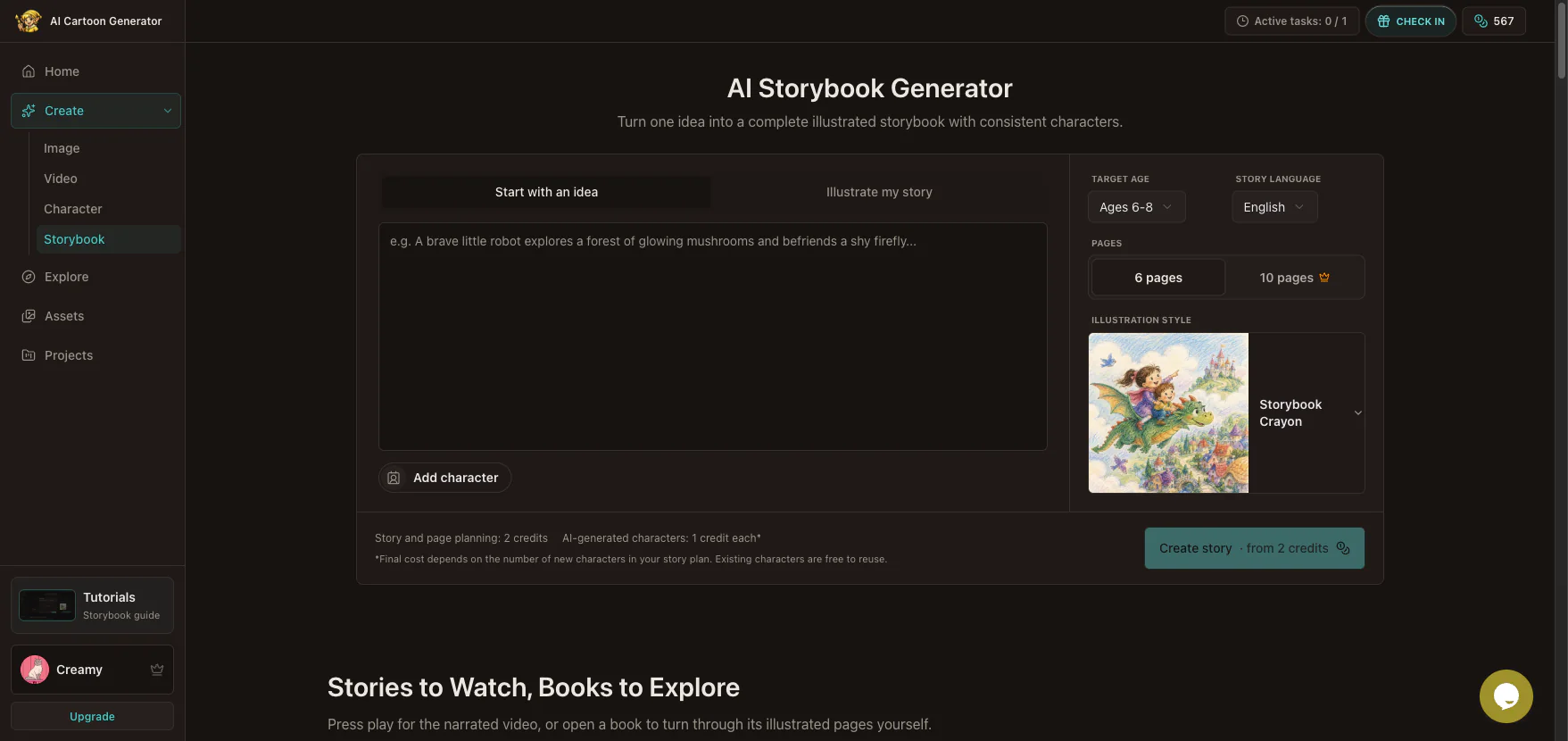
You can make an AI storybook by giving the generator a clear idea or a finished manuscript, choosing the audience and illustration style, adding recurring characters, and reviewing the planned story before generating its pages. After the illustrations are ready, check every page for story-image agreement, regenerate only the pages that need work, then read, export, share, or turn the finished book into a narrated video.
This guide follows the real workflow in the AI Storybook Generator, including the Production tools not covered in the short product video. You will see where human decisions matter, how saved Character Assets improve continuity, and why the best time to fix a story problem is before you generate all of its illustrations.
What Do You Need Before You Make an AI Storybook?
You do not need a polished manuscript or drawing skills. You do need a clear starting point and a few decisions that help the system plan a coherent book.
| Decision | Practical question | Why it matters |
|---|---|---|
| Input mode | Do you have an idea or a finished story? | It determines whether the tool develops the narrative or illustrates your text. |
| Audience | Who will read the book? | Age affects vocabulary, pacing, and page density. |
| Language | Which language should the story use? | Set it before planning so text and narration belong together. |
| Page count | Is this a short read or a longer story? | More pages require more distinct story beats. |
| Characters | Who needs to look the same on every page? | A saved reference gives a recurring character a visual anchor. |
| Style | Which single visual direction fits the story? | One preset is clearer than several competing style instructions. |
Start with an idea is for a premise you want the tool to develop. Illustrate my story is for text you have already written and want divided into illustrated pages. Use the second mode when wording, plot order, or a particular ending must be preserved.
How to Make an AI Storybook Step by Step
1. Start with one story problem
Open the AI storybook maker and choose an input mode. If you start with an idea, describe the protagonist, the immediate problem, and the resolution you want. One or two sentences are usually enough.
Use this formula:
[protagonist] + [specific problem or goal] + [setting] + [important resolution]For example:
A young signal engineer follows the flashing rhythm of drifting harbor buoys
through a magical fog tide, finds a lost lighthouse keeper, and helps relight
the beacon before the fishing boats return.
This prompt gives the story a person, obstacle, place, and ending. It leaves room for the planner to build page turns without asking it to invent the purpose of the story.
Avoid “write a fun adventure about friendship.” It names a genre and theme but not a visible problem. Also avoid packing several unrelated lessons into one short book. A six-page story has little room for a rescue, a school conflict, a trip to space, and a recycling lesson.
Google's official introduction to its AI Storybook feature lists teaching a lesson, explaining a topic, using a child's drawing, and turning a memory into a story as possible starting points. The useful planning question is not “what can AI write?” but “what should this reader understand or feel by the final page?”
2. Choose the audience, language, length, and style
Set the target age and story language before creation. Younger readers usually benefit from one clear action per page, shorter sentences, repetition, and a concrete emotional change. Older readers can follow denser description and more complicated cause and effect.
Next, choose the page count. Think in story beats rather than word count. A simple six-page structure might be:
- Introduce the character and setting.
- Reveal the problem.
- Let the character try something.
- Add a complication.
- Resolve the central problem.
- Show what changed.
Finally, select one illustration style. The style preset handles rendering direction, so keep the story idea focused on subjects, actions, setting, and plot. Do not repeat a long list of style labels in the story prompt.
3. Add a saved character when identity matters
If the protagonist already exists, select that saved Character Asset before creating the story. A reference cannot guarantee identical pixels on every page, but it gives the system a stronger identity anchor than repeatedly describing the same person from memory.
For a new recurring character, first use the AI cartoon character generator, approve the strongest design, and save it. Our guide to creating a reusable cartoon character explains that process.
Choose a reference with an unobstructed face, readable silhouette, intended clothing and colors, no unrelated people, and enough resolution to see important details. The asset anchors identity; the story plan supplies each page's action, setting, framing, and supporting cast.
4. Review Story before generating illustrations
After planning, the workspace opens at Story. Read the title and summary as a compact test of the narrative. You should be able to identify the protagonist, problem, progression, and resolution without looking at pictures.

Fix structural problems here. Check whether the title fits, the central problem is specific, the ending answers the opening, the scope suits the page count, and the language fits the reader. If the summary introduces the wrong goal or resolves it too early, better-looking illustrations will not repair the narrative.
This is the least expensive point to change direction because you have not yet committed to a complete illustrated sequence.
5. Review the cast and character references
Move to Characters and inspect every planned cast member. Review names, roles, descriptions, and portraits before page generation.

Look for traits that could become ambiguous across scenes: similar clothing colors, nearly identical silhouettes, or accessories described as essential in one place and optional in another. If a portrait is wrong, refine that character before generating or regenerating its pages.
Character consistency is not only face matching. Readers notice changes in age, proportions, clothing, palette, and the character's relationship to the setting. A stable Character Asset helps, but your final review remains necessary.
6. Generate pages, then review text and image together
Once the story and cast are ready, generate the illustrations. The Pages step presents the cover and content pages as a sequence. Review the book in order, not as isolated attractive images.

For every page, check four layers:
- Story text: Is the action clear, concise, and in the right order?
- Illustration agreement: Does the image show the described action?
- Continuity: Do recurring characters, objects, and places remain recognizable?
- Page turn: Does the page add movement rather than repeat the last scene?
If the text is wrong, edit it first. If the text works but the image does not represent it, regenerate that page. Change one clear direction at a time.
For example:
Keep Mara and the foggy harbor. Show her reading the colored buoy lights from
the rowboat, with the lighthouse still dark in the distance.
Regenerate only the weak page rather than restarting the whole book. This preserves successful pages and makes continuity easier to judge.
What Can You Do in the Production Step?
The short Storybook tutorial video ends with reviewing the book. The editor continues into Production, where you choose how the finished work is experienced.
Read and check the finished Storybook
The Storybook tab presents the pages in the reader. Use it for a pacing check because a book can feel different as page turns instead of editable cards. Confirm that no sentence depends on an illustration from the previous page, that the ending feels complete, and that page order is correct.

You can return to Pages whenever you need to adjust text or illustrations. The workspace also provides PDF export and sharing controls; availability can depend on the current plan. Treat the reader as proofing mode, not a point of no return.
Add narration and create a story video
Open Narrated video to choose a narrator, preview the voice, and generate voiceovers. You can generate missing voiceovers together or work page by page. If you change narration text or the selected voice after audio exists, regenerate the affected voiceover so audio matches the current book.

Read each line aloud before generating audio. Prose can look fine on screen but sound crowded when spoken. Shorten awkward clauses, remove repeated names, and check pronunciation-sensitive words.
The story video becomes available when content pages have selected illustrations and ready voiceovers. The panel shows those prerequisites separately. After creation, preview the whole video before downloading it. If story text, illustrations, or narration changes later, regenerate the video so it reflects the latest book.
The Animation tab is currently marked Coming soon. It is not the narrated video available today. The narrated video combines finished illustrations and narration; it does not promise fully animated character motion. For a separate animated scene, use the AI cartoon video generator with an approved still as the starting point.
Five Common AI Storybook Mistakes
Generating pages before fixing the story
A polished illustration cannot repair a missing motivation or an ending that does not resolve the problem. Approve the title, summary, cast, and sequence first.
Treating character consistency as automatic
Use a saved reference and inspect every page. Hair, clothes, proportions, accessories, and age can still drift. Regenerate the affected page with one precise correction.
Asking one page to show several moments
An illustration works best when it captures one readable beat. If a sentence contains several actions across time, simplify it or move one action to another page.
Editing too many variables at once
Changing the character, action, setting, camera, and style together makes the result difficult to diagnose. Preserve what works and change the highest-priority problem.
Publishing without checking rights and platform rules
Use text and images you created, own, or have permission to use. For openly licensed material, review the exact Creative Commons license conditions. Copyright treatment of AI-generated material varies by jurisdiction and human contribution; the U.S. Copyright Office AI initiative is one authoritative starting point, not universal legal advice.
Amazon KDP's current AI content guidelines require disclosure of AI-generated text, images, or translations and distinguish them from AI-assisted content. Recheck every platform before publishing because policies can change.
A Final Review Checklist
Before you share, export, or create the narrated video, confirm:
- the title and summary describe the book you made;
- each page advances the story;
- every illustration agrees with its page text;
- recurring characters remain recognizable;
- important props do not disappear without a reason;
- narration sounds natural when read aloud;
- the reader and video use the latest selected pages;
- you have permission to use all source material;
- the publishing platform accepts the content and disclosures.
The goal is not to remove every trace of variation. It is to make sure readers can follow the same characters through a clear sequence without distraction from accidental changes.
Frequently Asked Questions
Can AI make a complete illustrated storybook?
Yes. An AI storybook generator can plan a short narrative, create a cast, generate a cover and page illustrations, and assemble the result for reading. You should still review structure, age fit, character continuity, image-text agreement, and rights before publishing.
Can I use my own story instead of AI-written text?
Yes. Choose Illustrate my story and provide your finished text. Review how it is divided into pages, because a strong manuscript may still need shorter page beats for an illustrated format.
How do I keep the same character across every page?
Select a saved Character Asset before planning, keep the reference throughout the workflow, and review each page for facial features, clothing, proportions, colors, and accessories. Regenerate only the pages that drift.
Can I make an AI storybook from a photo?
First turn an approved image into a reusable character with the cartoon character workflow, then add that saved character to the Storybook generator. Use photos you own or have permission to use, especially when a child or another identifiable person appears.
Can an AI storybook include narration?
Yes. In Production, choose a narrator, generate voiceovers for individual or missing pages, preview the audio, and create a narrated story video after every content page has an illustration and voiceover.
Should I regenerate the whole book when one image is wrong?
No. Confirm the page text first, then regenerate only the affected page with a focused correction. Keeping successful pages makes the revision easier to evaluate and reduces unnecessary variation.
Can I publish an AI-generated children's book?
That depends on tool terms, rights to your inputs, local law, and the platform's rules. Keep records of sources and edits, disclose AI-generated content where required, and seek qualified advice for commercial or high-risk uses.
Create and Review Your Storybook
The most reliable workflow is a sequence of approvals: define one story problem, choose the audience and style, lock recurring characters, approve the story and cast, generate the pages, then revise text and images together. Production comes last, after the book works as a book.
Open the AI Storybook Generator, start with one clear idea or your manuscript, and complete Story review before generating illustrations. When every page supports the same narrative, move to Production to read, export, share, or create the narrated video.