

DeepSeek V4 Flash Vision is DeepSeek's new experimental image-understanding model. Our API test found that it can turn a character image into a usable image prompt, video storyboard, or Storybook outline, but every workflow still needed validation. It reads images and returns text; it does not generate images or video itself.
For cartoon work, it's more of a pre-production assistant. You give it a reference image, it identifies the characters, setting, and props, then turns that into something an image, video, or Storybook generator can actually use.
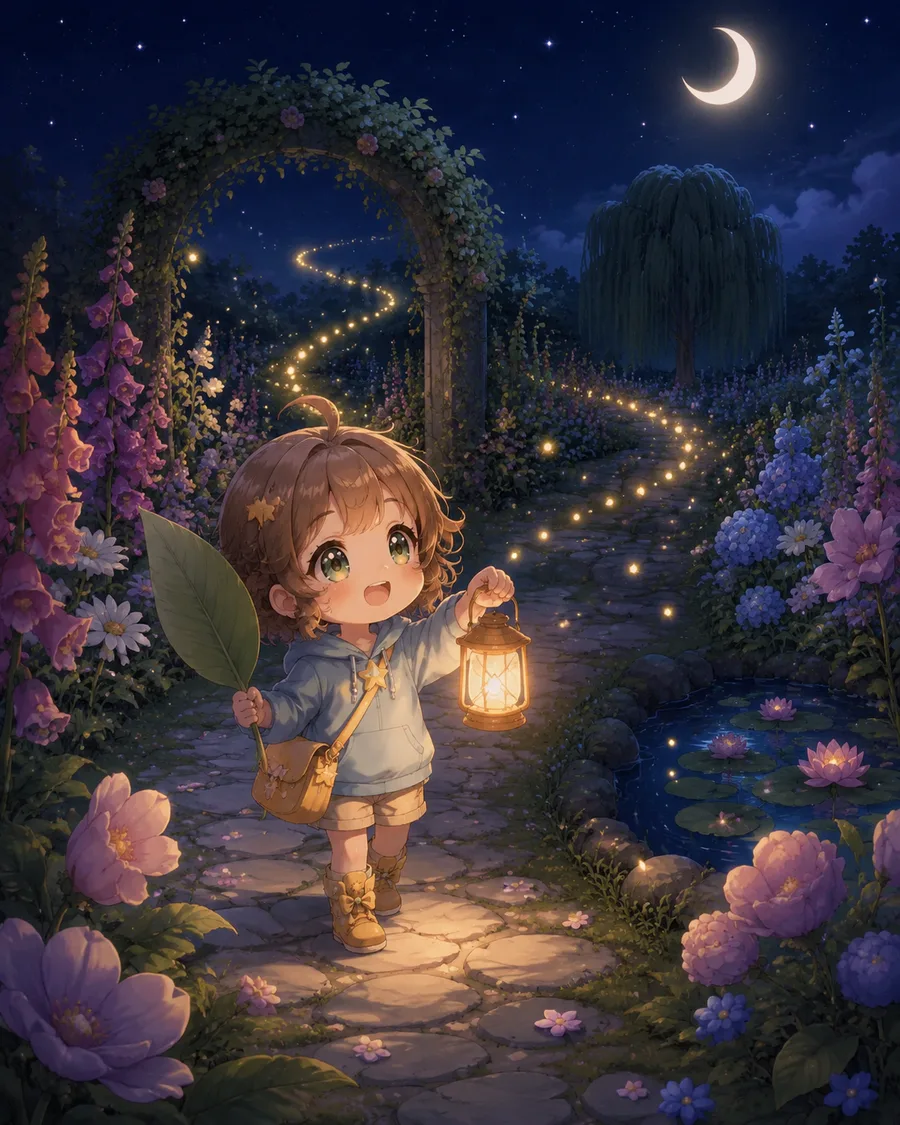
We picked a character image that AI Cartoon Generator produced in a real workflow and asked DeepSeek V4 Flash Vision to develop it into an image prompt, a video storyboard, and a six-page Storybook. We're showing what worked and what didn't, exactly as it happened.
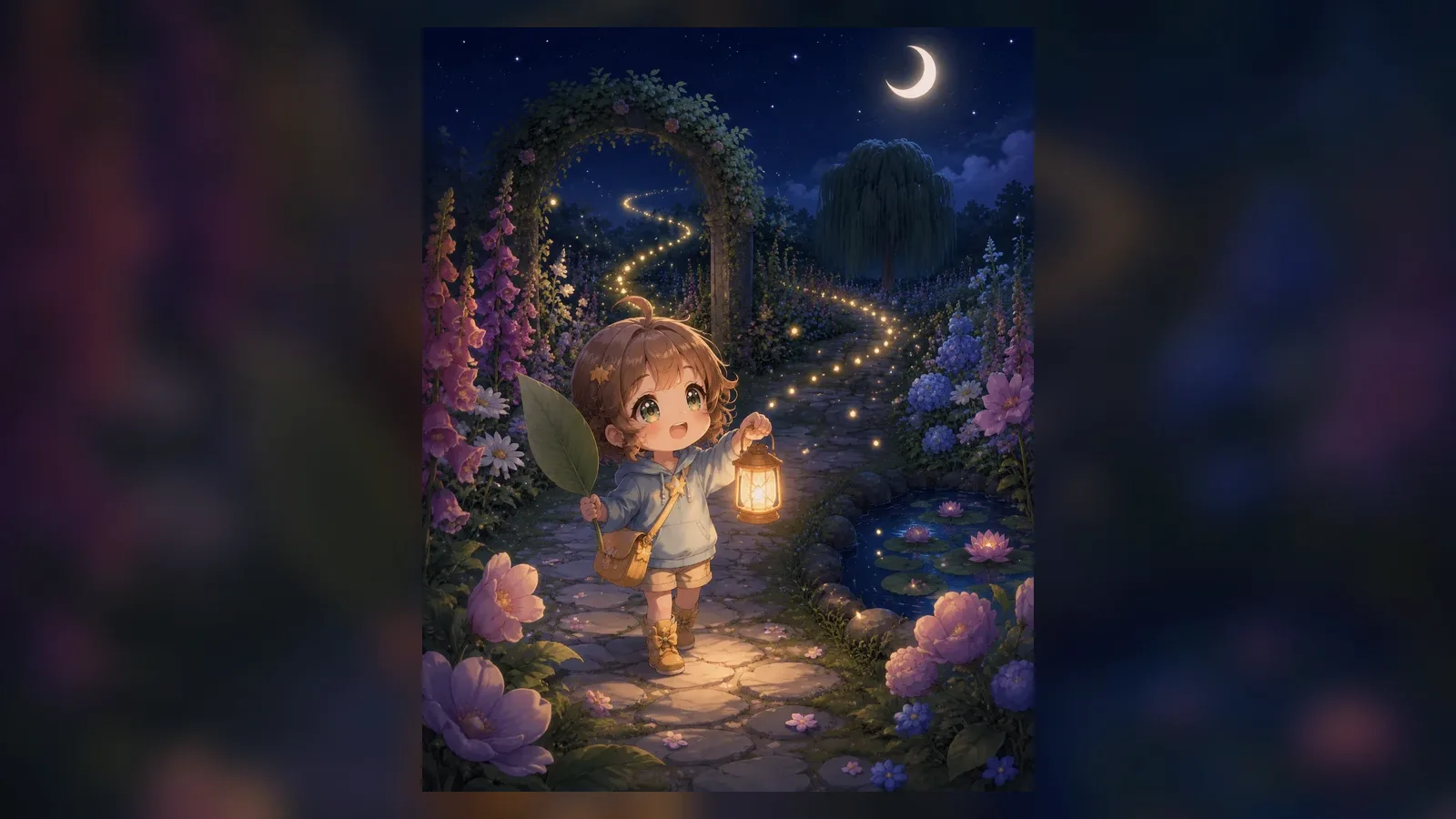
DeepSeek V4 Flash Vision Test Results at a Glance
We tested the official deepseek-v4-flash-vision-exp API on three production-adjacent creative tasks. The image prompt needed only light cleanup. The video plan needed continuity fixes and simplification. The Storybook draft required a rewrite before illustration.
| Workflow | What Passed | What Failed | Practical Verdict |
|---|---|---|---|
| Image prompt | 80 words, correct visible details, no style name | Added several irrelevant negative constraints | Usable after light editing |
| Video storyboard | Valid 8-second plan and final prompt | Two camera moves, outfit drift, assumed gender, too many actions | Simplify and fix continuity first |
| Six-page Storybook | Complete six-page narrative arc | Every page missed the word-count rule; new characters appeared | Rewrite and validate before use |
This is a hands-on workflow test, not a general benchmark of the model. It uses one reference image and one completed response per task. The results show the kinds of mistakes an integration must catch; they do not measure OCR, charts, screenshots, or performance across a larger dataset.
What Is DeepSeek V4 Flash Vision?
DeepSeek released deepseek-v4-flash-vision-exp on August 21, 2026. According to the official release announcement, it's an experimental multimodal vision understanding model that adds image input to V4 Flash's text capabilities.
Let's clear up some easily confused names first:
| Name | Accepts Images | Best For |
|---|---|---|
deepseek-v4-flash | No | Text generation, reasoning, and agent tasks |
deepseek-v4-flash-vision-exp | Yes | Image understanding, visual Q&A, image-based text planning |
| Third-party V4 Flash Vision projects | Depends on implementation | May be external vision encoders, proxy layers, or community vision bridges |
Regular deepseek-v4-flash won't suddenly understand images just because you add an image_url to the request. We sent the same image to plain Flash and the API returned HTTP 400 with This model does not support image. For image input, you must use the official Vision Exp model.
DeepSeek's official Vision API documentation states that the model accepts images and text but still outputs text. It can understand visual material, but actual PNGs, videos, or storybook illustrations still need to come from dedicated generation models.
How We Ran the Three Creative Tests
Testing took place on August 22, 2026. All three requests used the same 1122 × 1402 PNG, passed via a public image URL with detail set to high. This image came from a real Storybook generation flow on this site; DeepSeek didn't create it. We only used it to test the model's image-reading ability.
All three requests used the same settings:
- Model:
deepseek-v4-flash-vision-exp - Image detail:
high - temperature:
0.2 - thinking:
disabled - Output requirement: valid JSON, no Markdown code fences
| Task | Input Tokens | Output Tokens | Total Tokens | Finish Status |
|---|---|---|---|---|
| Image prompt | 483 | 255 | 738 | stop |
| Video storyboard (8s) | 507 | 418 | 925 | stop |
| Six-page Storybook | 519 | 1116 | 1635 | stop |
We initially kept thinking enabled, and it didn't go well. The image prompt request had max_tokens set to 1200, and all 1200 output tokens were consumed by reasoning, leaving content empty. The Storybook request hit a similar wall: 4374 of 5000 output tokens went to reasoning, and the story got cut off mid-page-two. After disabling thinking, all three tasks returned complete results in one pass.
This isn't a judgment on thinking mode itself. It just shares the output token budget with the final text. For fixed-format tasks, long internal reasoning usually isn't necessary; if you do need it, leave more output room and check finish_reason.
Test One: Extracting an Image Prompt from a Reference Image
The first task was to distill a 55–90 word English text-to-image prompt from the reference image. We asked the model to describe only what was actually visible, avoid guessing, and skip style names, since this site adds the user's chosen style separately before generating.
The core request was:
Study the reference image and write one reusable English text-to-image prompt
that recreates its core story moment without naming a style.
Return observed_subject, observed_setting, generation_prompt,
and negative_constraints. Keep generation_prompt between 55 and 90 words.
DeepSeek's generation_prompt was:
A small child with brown hair and large green eyes stands on a stone path in a
nighttime garden. They hold a glowing lantern in one hand and a large green leaf
in the other, wearing a light blue hoodie and tan shorts. A flower-covered
archway frames the scene, with a pond of water lilies nearby. A winding trail of
glowing lights leads into the distance under a crescent moon and starry sky,
surrounded by tall purple and pink flowers.
That's 80 English words, within the 55–90 range. It correctly identified the child, brown hair, blue hoodie, lantern, leaf, stone path, pond, flower archway, and moon, and it didn't inject any style names.
The model also returned these negative constraints:
No text, no captions, no logos, no watermarks, no modern buildings,
no daytime lighting, no harsh shadows, no other people, no vehicles,
no animals, no rain, no snow.
"No text, no watermarks, no other people" is genuinely useful. "No vehicles, no rain, no snow" isn't wrong, but neither the source image nor the task called for them. You should prune these extras before using the output, not blindly copy whatever negative prompt the model writes.
If you want to reuse this subject and setting description, drop the cleaned-up prompt into the text-to-cartoon generator and pick the cartoon, anime, clay, or Storybook style you want. That keeps "what to draw" and "what style to draw it in" separate.
Test Two: Turning One Image into a Video Storyboard
The second task expanded the same static image into an 8-second single shot with a four-segment timeline, camera movement, continuity constraints, sound, and a final video prompt. We weren't trying to cram a full story into eight seconds, just one clear action and one emotional beat.
The model's timeline:
| Time | DeepSeek-generated action |
|---|---|
| 0–2s | Child stands on the stone path, looking at the crescent moon and the winding trail of lights |
| 2–4s | Child steps forward and raises the lantern to light the path ahead |
| 4–6s | Child turns slightly to the right, looking at the lily pond and fireflies |
| 6–8s | Child smiles and gently swings the lantern, warm light illuminating the surrounding flowers |
It also suggested:
Slow, smooth dolly-in with a slight tilt-up, maintaining a medium-full shot of
the child.
The final video prompt came in at 81 English words:
A cute chibi child with brown hair and a blue hoodie stands on a stone path in a
magical night garden. She holds a glowing lantern and a large green leaf. The
garden is filled with pink and purple flowers, a pond with water lilies, and a
stone archway. A crescent moon shines in the starry sky. Fireflies and a winding
trail of lights lead into the distance. The child looks around with wonder, her
lantern casting a warm, golden glow.
The overall direction was sound, and the final prompt stayed within the 60–100 word limit. But looking closer, three issues stand out:
- We asked for one camera move, and it gave us both a dolly-in and a tilt-up.
- The
continuity_lockschanged the original tan shorts to yellow shorts. - The source image doesn't reveal the character's gender, yet the final prompt uses
she.
The timeline also has too much happening: stepping forward, turning, and swinging the lantern all compete for eight seconds. If I were actually generating video from this, I'd keep only "step forward and raise the lantern" and drop the turn and the second camera move.
After fixing those issues, you can upload the character reference image to the AI cartoon video generator and produce a short video with one clear action, one camera move, and simple background sound.
Test Three: Planning a Six-Page Storybook from One Character Image
The third task was a six-page story for readers aged 5–7, including title, summary, theme, characters, continuity, and cover notes. Each page's narration needed to be 35–55 English words, and the character list could only include characters that actually appear in the image and continue to matter.
DeepSeek named the story Luna's Lantern Path, with the theme "courage and magic found in a small light against the dark." All six pages were written, and the story has a complete arc: Luna enters the garden, follows the lights to the pond, hears the willow's request, wakes the flowers with her lantern, and returns home.
| Page | Narration Summary | Actual Word Count |
|---|---|---|
| 1 | Luna enters the night garden and raises her lantern, ready for adventure | 28 |
| 2 | She follows star-like twinkling lights deeper into the garden | 26 |
| 3 | She reaches the pond and lights up the water with her lantern | 26 |
| 4 | The willow tree asks her to help the sleeping flowers bloom | 25 |
| 5 | She lifts her lantern and lets golden light touch the petals | 24 |
| 6 | The garden lights up and she walks home with a bright heart | 25 |
The six pages of raw narration:
1. Luna stepped into the night garden. The moon was a silver smile, and the
flowers were fast asleep. She held her lantern high, ready for a new adventure.

2. A trail of tiny lights danced ahead of her. They looked like fallen stars,
twinkling and winking. Luna giggled and followed them deeper into the garden.

3. The lights stopped by a pond. The water was dark and still. Luna leaned over,
but her lantern's glow made the water sparkle like a mirror.

4. A soft whisper came from the willow tree. 'Little light, the flowers are too
sleepy to wake. Can you help them bloom?' Luna nodded bravely.

5. Luna lifted her lantern high. A warm golden light spilled out, touching every
petal. One by one, the flowers opened their eyes and smiled.

6. The garden was full of light and color. Luna smiled, knowing she had helped.
She walked home, her heart as bright as her little lantern.
The story reads as complete, but checking item by item reveals real problems. The six pages of narration are only 24–28 words each; not one page hits the required 35–55. The character list also includes The Willow Tree and The Fireflies, and the willow even gets dialogue, even though the source image doesn't support these additions.
So this output isn't ready to feed straight into illustration generation. In a real product, you'd need automated checks for page count, per-page word count, character provenance, and visual descriptions, then decide whether to have the model rewrite the narration or remove the invented characters.
Once those issues are fixed, put the story into the AI Storybook generator to produce editable narration, cover art, and page illustrations. Locking down character definitions and continuity first beats writing a fresh prompt for every page and hoping the character doesn't drift.
How to Call the DeepSeek V4 Flash Vision API
The official docs support three common image input methods: Base64, public image URLs, and the Files API's file_id. For a quick test with a small image, Base64 works; if the image already has a public link, pass the URL directly; for repeated use of the same image, the Files API is more convenient.
Here's a simplified Python example:
import os
from openai import OpenAI

client = OpenAI(
    api_key=os.environ["DEEPSEEK_API_KEY"],
    base_url="https://api.deepseek.com",
)

response = client.chat.completions.create(
    model="deepseek-v4-flash-vision-exp",
    messages=[
        {
            "role": "user",
            "content": [
                {
                    "type": "text",
                    "text": "Analyze the reference image and generate a single-shot 8-second video prompt.",
                },
                {
                    "type": "image_url",
                    "image_url": {
                        "url": "https://example.com/reference.png",
                        "detail": "high",
                    },
                },
            ],
        }
    ],
    extra_body={"thinking": {"type": "disabled"}},
)

print(response.choices[0].message.content)
The image goes in the user message. detail: "low" is fine for a general sense of the content; if you need to distinguish character outfits and small props, choose high or original. For file size limits, image count, and input method restrictions, check the official Vision documentation.
Why You Still Need to Validate the JSON
All three official test requests returned parseable JSON with no Markdown code fences. But in earlier trial runs, even when we explicitly asked for "valid JSON only," the model wrapped the output in code fences anyway. This success doesn't guarantee the format will always be correct.
When integrating into a real product, at minimum check:
- Whether the response parses as JSON
- Whether required fields exist and have the right types
- Whether the timeline or Storybook page count meets requirements
- Whether narration and final prompts fall within word limits
- Whether character names, outfits, and key props stay consistent across scenes
- Whether the output sneaks in disallowed style words, captions, or watermark requests
- Whether
finish_reasonisstoprather thanlength
For prompt cleanup or fixed-format tasks, long internal reasoning usually isn't needed. The official thinking mode documentation can help you decide when to disable it. For more complex story logic, keeping it on makes sense, but raise the output limit and be prepared to handle truncated responses.
When Is It Worth Using?
If you already have a character image or illustration and want to develop it into other content, DeepSeek V4 Flash Vision is genuinely useful:
- You have a character image and want a reusable scene prompt
- You have a finished illustration and want to design a short motion shot
- You have a character and world and want to expand it into a multi-page children's story
- You need structured character, scene, and prop extraction from a reference image
If you just want to generate a cartoon image, there's no need to route through a vision model first. Go straight to the AI Cartoon Generator, type your idea, or upload a reference image. The vision model earns its keep when you want to reuse the same material, keep a character consistent, or extend one character into video and Storybook formats.
FAQ
Does DeepSeek V4 Flash support image input?
Regular deepseek-v4-flash does not accept images. To work with images, you need the official model ID deepseek-v4-flash-vision-exp.
Can DeepSeek V4 Flash Vision generate images directly?
No. It reads images and writes text. To get actual images, you still need a text-to-image or image-editing model.
Is Vision Exp the same as community DeepSeek V4 Flash Vision projects?
Not necessarily. The official Vision Exp has a clear API ID. Community projects may connect to different vision encoders, proxy layers, or independently deployed models, with different calling conventions and capabilities.
Should I use an image URL, Base64, or the Files API?
For occasional small-image tests, Base64 works. If the image is already at a public URL, pass that directly. For repeated use of the same image or larger files, consider the Files API.
Why does the API return many reasoning tokens but no content?
Thinking and the final text share max_tokens. If reasoning consumes the budget first, the content can come back empty. For fixed-format tasks, disable thinking; if you need it, increase the output limit and watch finish_reason.
Can I save the model's JSON output directly?
Not recommended. Strip any code fences first, then check JSON validity, field structure, array lengths, word counts, and character continuity.
Verdict: Best for Pre-Production Planning
Across these three tests, DeepSeek V4 Flash Vision's best position isn't final generation, it's pre-production organization and planning. Give it a character image and it quickly produces an image prompt, video storyboard, and Storybook draft, saving you from starting from a blank page.
But the output isn't ready to use as-is. The image prompt was mostly solid, the video storyboard got the camera move and outfit wrong, and the Storybook filled six pages yet missed the word count on every one and added characters on its own. Valid JSON only proves the format is intact, not that the content is correct.
The more practical approach is to have it read the image and draft first, then hand the prompt, storyboard, or story to the appropriate generation tool, and finally check characters, outfits, actions, word counts, and format yourself. It speeds up the front end of the work, but it doesn't replace final judgment.
Related reading: What is an AI cartoon generator? and Best AI cartoon generators in 2026.